Custom Search

Monday, February 25, 2013

PHP FUNCTION


PHP FUNCTION

FUNCTION
  • A Function is a reusable piece of code. 
  • You will write it once and you can use it many times. 
  • For example, We can make a function to perform addition or subtraction or calculation of VAT, And we can use it as many times as we want. 
  • Functions have a body structure{}

 In PHP the keywords for functions are: function, return

To use a function we have two steps:
  1. function declaration
  2. function invocation (or call)


To declare a function:

you use the keyword function followed by the name of the function, two parentheses and the block of code in between two curly braces:

function fooName(parameters)
{
    // Function body goes here
    return $returnValue;
}

Functions do not have to return anything, so the return statement can be left out.

Variables used within the function are local to that function and do not effect the global scope.

  1. User defined PHP Functions
  2. zero parameter funtion

PHP Functions with Parameters:
PHP gives you option to pass your parameters inside a function. You can pass as many as parameters your like.
These parameters work like variables inside your function.
Following example takes two integer parameters and add them together and then print them.
Writing PHP Function with Parameters

function addFunction($num1, $num2)
{
  $sum = $num1 + $num2;
  echo "Sum of the two numbers is : $sum";
}
addFunction(10, 20);
?>

This will display following result:

Sum of the two numbers is : 30

Passing Arguments by Reference:
It is possible to pass arguments to functions by reference.
This means that a reference to the variable is manipulated by the function rather than a copy of the variable's value.
Any changes made to an argument in these cases will change the value of the original variable.
You can pass an argument by reference by adding an ampersand to the variable name in either the function call or the function definition.
Following example depicts both the cases.
Passing Argument by Reference
function addFive($num)
{
   $num += 5;
}

function addSix(&$num)
{
   $num += 6;
}
$orignum = 10;
addFive( &$orignum );
echo "Original Value is $orignum
";
addSix( $orignum );
echo "Original Value is $orignum
";
?>


This will display following result:
Original Value is 21

PHP Functions retruning value:
A function can return a value using the return statement in conjunction with a value or object. return stops the execution of the function and sends the value back to the calling code.
You can return more than one value from a function using return array(1,2,3,4).
Following example takes two integer parameters and add them together and then returns their sum to the calling program. Note that return keyword is used to return a value from a function.
Writing PHP Function which returns value

function addFunction($num1, $num2)
{
  $sum = $num1 + $num2;
  return $sum;
}
$return_value = addFunction(10, 20);
echo "Returned value from the function : $return_value
?>

This will display following result:
Returned value from the function : 30

Setting Default Values for Function Parameters:
You can set a parameter to have a default value if the function's caller doesn't pass it.
Following function prints NULL in case use does not pass any value to this function.
Writing PHP Function which returns value

function printMe($param = NULL)
{
   print $param;
}
printMe("This is test");
printMe();
?>


This will produce following result:
This is test

Dynamic Function Calls:
It is possible to assign function names as strings to variables and then treat these variables exactly as you would the function name itself. Following example depicts this behaviour.
Dynamic Function Calls
function sayHello()
{
   echo "Hello
";
}
$function_holder = "sayHello";
$function_holder();
?>

This will display following result:
Hello

PHP Built-in Functions
  • A built-in function is denoted by a function name followed by zero or more operands which are enclosed in parentheses. 
  • The operands of functions are called arguments, and each argument is specified by an expression
  • The result of a function is a single value derived by applying the operation of the function to the arguments.
  • PHP comes with many built-in (or internal) functions. 
  • We don't have to define those functions. 
  • We just need to use them, by calling their names and passing them values. 
  • PHP has nearly 3,000 built in functions covering pretty much anything you could want to do with a web application.


date() function:


   echo "". date("D") ."
";         //Day name in three letters   => Tue
   echo "". date("M") ."
";         //Month name in three letters => Dec
   echo "". date('l, jS F Y')."
"; //Day, date Month Year => Monday, 23 March 1920
?>


  Here some examples of functions to use to handle form data:

/*

   strval(intval($variable))  //STRVAL gets the string value of a variable
   strval(floatval($variable))  //INTVAL and FLOATVAL get the integer/float value of a var
   addslashes($variable)       // Escape single quote with a back slash
   stripslashes($variable)     // Escape back slash from string
?>
*/

Using print_r():


   $arr = array("a"=>"dog",
                      "b"=>"cat",
                      "c"=>"horse",
                      "reptiles"=> array("snakes", "lizards", "turtles")
  );

  echo "
";

  print_r($arr);

  echo "
";

/*

Array
(
    [a] => dog
    [b] => cat
    [c] => horse
    [reptiles] => Array
        (
            [0] => snakes
            [1] => lizards
            [2] => turtles
        )

)
*/
?>

Using mail() to send an email:

   //to send an email
   mail($to, $subject, $message, $from);
   echo "Thank you for sending email";
?>


PHP ARRAY


PHP ARRAY


ARRAY

  • An array is a data structure that stores one or more values in a single value.
  • For experienced programmers it is important to note that PHP's arrays are actually maps (each key is mapped to a value).
  • The array() function is used to create an array.

Syntax

Specifying with array()

An array can be created using the array() language construct. It takes any number of comma-separated key=> value pairs as arguments.
array(
    key  => value,
    key2 => value2,
    key3 => value3,
    ...
)

There are three types of arrays:

  1. Indexed arrays - Arrays with numeric index
  2. Associative arrays - Arrays with named keys
  3. Multidimensional arrays - Arrays containing one or more arrays


Indexed arrays -Numeric Array

  • These arrays can store numbers, strings and any object but their index will be prepresented by numbers. By default array index starts from zero.


Example

Following is the example showing how to create and access numeric arrays.
Here we have used array() function to create array. 
This function is explained in function reference.
/* First method to create array. */
$numbers = array( 1, 2, 3, 4, 5);
foreach( $numbers as $value )
{
  echo "Value is $value
";
}
/* Second method to create array. */
$numbers[0] = "one";
$numbers[1] = "two";
$numbers[2] = "three";
$numbers[3] = "four";
$numbers[4] = "five";

foreach( $numbers as $value )
{
  echo "Value is $value
";
}
?>


This will produce following result:

Value is 1
Value is 2
Value is 3
Value is 4
Value is 5
Value is one
Value is two
Value is three
Value is four
Value is five

Associative Array

  • The index position is start from 0, the second is index position is 1 and so on. 
  • PHP supports associative array, in which we can associate any kind of key (generally string or numeric) with a value.

Use

Sometimes it is more beneficial to have String keys or indexes in an array instead of numeric keys. 
For instance if you want to store the salary of  employee or the marks obtained by the students, then it will be more beneficial to use associative array instead of using numeric array.

Initializing an Associative array

$array=array("City"=>"New Delhi", "State"=>"Delhi"," Pin"=>110029)

Like the numerically indexed array we can create and initialize an associative array with one element at a time. 

Following example will help you to understand this concept:

Example:

$array["Sedan"]="Manza";
$array['suv']="Safari";
$array['nano']=2009;
print_r($array);
?>
Output:

Array ( [Sedan] => Manza [suv] => Safari [nano] => 2009 )

Multi-dimensional Array

  • Multi-dimensional array, each element in the main array can also be an array. And each element in the sub-array can be an array, and so on.
  • Multidimensional array is a structure which holds various arrays in an array.
  • Multi-dimensional array value are accessed using multiple index.

Example

In this example we create a two dimensional array to store marks of three students in three subjects:

Multi-dimensional Array example

   
    $marksheet = array(
         "Nitin" => array
          (
          "physics" => 82,        
          "maths" => 70,          
           "chemistry" => 89       
          ),
        "Sachin" => array
        (
         "physics" => 70,
         "maths" => 85,
         "chemistry" => 89
        ),
        "Priyanka" => array
        (
        "physics" => 81,
        "maths" => 72,
        "chemistry" => 90
        )
        );
   /* Multi-dimensional array values accessing */
   echo "Marks for Nitin in physics : " ;
   echo $marksheet['Nitin']['physics'] . "
";
   echo "Marks for Sachin in maths : ";
   echo $marksheet['Sachin']['maths'] . "
";
   echo "Marks for Priyanka in chemistry : " ;
   echo $marksheet['Priyanka']['chemistry'] . "
";
    ?>


Output


Saturday, February 23, 2013

CONDITIONAL STATEMENTS


What is PHP?

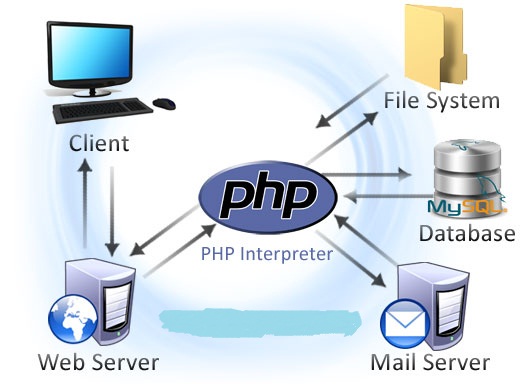
  • PHP (recursive acronym for PHP: Hypertext Preprocessor) is a widely-used open source general-purpose scripting language that is especially suited for web development and can be embedded into HTML.
  • PHP is probably the most popular scripting language on the web. It is used to enhance web pages.

  • With PHP, you can do things like create username and password login pages, check details from a form, create forums, picture galleries, surveys, and a whole lot more.
  • If you've come across a web page that ends in PHP, then the author has written some programming code to liven up the plain, old HTML.
  • PHP is known as a server-sided language.
  • That's because the PHP doesn't get executed on your computer, but on the computer you requested the page from. 


CONTROL STATEMENTS

  • PHP supports a number of traditional programming constructs for controlling the flow of execution of a program.
  • Conditional statements, such as if/else and switch, allow a program to execute different pieces of code, or none at all, depending on some condition. 
  • Loops, such as while and for, support the repeated execution of particular code.
If Statement

The if statement checks the truthfulness of an expression and, if the expression is true, evaluates a statement.

An if statement looks like: Syntax:

if (expression)
  statement

For example:

if ($user_validated)
  echo "Welcome!";


If ... Else Statement

  • The If Statement is a way to make decisions based upon the result of a condition. For example, you might have a script that checks if boolean value is true or false, if variable contains number or string value, if an object is empty or populated, etc. 
  • The condition can be anything you choose, and you can combine conditions together to make for actions that are more complicated.
  • Use the if statement to execute a statement if a logical condition is true. Use the optional else clause to execute a statement if the condition is false. 


The syntax for If statement looks as follows:
if (condition) {
   statements_1
} else {
   statements_2
}

For example:

$result = 70;

if ($result >= 57) {
    echo "Pass
";
}
else {
    echo "Fail
";
}
?>

 Else ......If Statement

if (condition_1) {
   statement_1
}
[elseif (condition_2) {
   statement_2
}]
...
[elseif (condition_n_1) {
   statement_n_1
}]
[else {
   statement_n
}]


  • Next example use the elseif variant on the if statement. This allows us to test for other conditions if the first one wasn't true.
  •  The program will test each condition in sequence until:
  • It finds one that is true. In this case it executes the code for that condition.
  • It reaches an else statement. In which case it executes the code in the else statement.
  • It reaches the end of the if ... elseif ... else structure. In this case it moves to the next statement after the conditional structure.

For example:

$result = 70;

if ($result >= 75) {
    echo "Passed: Grade A
";
}
elseif ($result >= 60) {
    echo "Passed: Grade B
";
}
elseif ($result >= 45) {
    echo "Passed: Grade C
";
}
else {
    echo "Failed
";
}
?>

Switch Statement

  • Switch statements work the same as if statements. 
  • However the difference is that they can check for multiple values. 
  • A switch statement allows a program to evaluate an expression and attempt to match the expression's value to a case label. 
  • If a match is found, the program executes the associated statement.

 The syntax for the switch statement as follows:

switch (expression) {
   case label_1:
      statements_1
      [break;]
   case label_2:
      statements_2
      [break;]
   ...
   default:
     statements_n
     [break;]
}
  • The program first looks for a case clause with a label matching the value of expression and then transfers control to that clause, executing the associated statements.
  • If no matching label is found, the program looks for the optional default clause, and if found, transfers control to that clause, executing the associated statements.
  • If no default clause is found, the program continues execution at the statement following the end of switch. 
  • Use break to prevent the code from running into the next case automatically.

Let's consider an example:
$flower = "rose";

switch ($flower)
{
  case "rose" :
     echo $flower." costs $2.50";
     break;
  case "daisy" :
     echo $flower." costs $1.25";
     break;
  case "orchild" :
     echo $flower." costs $1.50";
     break;
  default :
     echo "There is no such flower in our shop";
     break;
}
?>
  • If an expression successfully evaluates to the values specified in more than one case statement, only the first one encountered will be executed. 
  • Once a match is made, PHP stops looking for more matches.


Thursday, February 21, 2013

PHP AND VARIABLES


What is PHP?
  • PHP stands for PHP: Hypertext Preprocessor
  • PHP is a widely-used, open source scripting language
  • PHP scripts are executed on the server
  • PHP is free to download and use
What is a PHP File?
  • PHP files can contain text, HTML, JavaScript code, and PHP code
  • PHP code are executed on the server, and the result is returned to the browser as plain HTML
  • PHP files have a default file extension of ".php"
What Can PHP Do?
  • PHP can generate dynamic page content
  • PHP can create, open, read, write, and close files on the server
  • PHP can collect form data
  • PHP can send and receive cookies
  • PHP can add, delete, modify data in your database
  • PHP can restrict users to access some pages on your website
  • PHP can encrypt data
  • With PHP you are not limited to output HTML. You can output images, PDF files, and even Flash movies. You can also output any text, such as XHTML and XML.
Why PHP?
  • PHP runs on different platforms (Windows, Linux, Unix, Mac OS X, etc.)
  • PHP is compatible with almost all servers used today (Apache, IIS, etc.)
  • PHP has support for a wide range of databases
  • PHP is easy to learn and runs efficiently on the server side
  • Creating (Declaring) PHP Variables
  • PHP has no command for declaring a variable.
  • A variable is created the moment you first assign a value to it:
  • $txt="Hello world!";
  • $x=5;
  • After the execution of the statements above, the variable txt will hold the value Hello world!, and the variable xwill hold the value 5.
  • Note: When you assign a text value to a variable, put quotes around the value.
  •  
  • PHP is a Loosely Typed Language
  • In the example above, notice that we did not have to tell PHP which data type the variable is.
  • PHP automatically converts the variable to the correct data type, depending on its value.
  • In a strongly typed programming language, we will have to declare (define) the type and name of the variable before using it.
PHP Variable Scopes
The scope of a variable is the part of the script where the variable can be referenced/used.
PHP has four different variable scopes:     
  1. local
  2. global
  3. static
  4. parameter


Local Scope
A variable declared within a PHP function is local and can only be accessed within that function:
Example
$x=5; // global scope

function myTest()
{
echo $x; // local scope
}

myTest();
?>


The script above will not produce any output because the echo statement refers to the local scope variable $x, which has not been assigned a value within this scope.
You can have local variables with the same name in different functions, because local variables are only recognized by the function in which they are declared.
Local variables are deleted as soon as the function is completed.

Global Scope

A variable that is defined outside of any function, has a global scope.
Global variables can be accessed from any part of the script, EXCEPT from within a function.
To access a global variable from within a function, use the global keyword:

Example

$x=5; // global scope
$y=10; // global scope

function myTest()
{
global $x,$y;
$y=$x+$y;
}

myTest();
echo $y; // outputs 15
?>

PHP also stores all global variables in an array called $GLOBALS[index]. The index holds the name of the variable.
This array is also accessible from within functions and can be used to update global variables directly.

The example above can be rewritten like this:
Example
$x=5;
$y=10;

function myTest()
{
$GLOBALS['y']=$GLOBALS['x']+$GLOBALS['y'];
}

myTest();
echo $y;
?>


Static Scope

When a function is completed, all of its variables are normally deleted. However, sometimes you want a local variable to not be deleted.
To do this, use the static keyword when you first declare the variable:

Example

function myTest()
{
static $x=0;
echo $x;
$x++;
}

myTest();
myTest();
myTest();

?>

Note: Then, each time the function is called, that variable will still have the information it contained from the last time the function was called. The variable is still local to the function.

Parameter Scope
A parameter is a local variable whose value is passed to the function by the calling code.
Parameters are declared in a parameter list as part of the function declaration:

Example


function myTest($x)
{
echo $x;
}

myTest(5);

?>

Note: Parameters are also called arguments